
Quick Summary
When a gate keypad is not working, the issue is often caused by low-voltage drops, corroded wiring, or tripped safety sensors rather than permanent device failure. Access control specialists at Ironworks Gate Co. recommend verifying power supply stability, checking relay continuity, and clearing sensor interlocks before attempting code resets or replacing components. Readers will understand how to systematically diagnose electrical and logic faults, as well as when to contact Ironworks Gate Co. for board-level repairs and same-day service.
“`html
Gate Keypad Not Working: Fix Access Fast and Securely
When you punch your access code into a driveway gate keypad and nothing happens, getting stranded in your driveway or out on the street is an immediate headache. An unresponsive keypad does not automatically mean the unit is ruined. Potential causes include low-voltage drop across wire runs, oxidized relay contacts inside a control box, or a triggered safety loop holding the system open.[2]
According to an ASIS International survey (2023), 17% of respondents experienced an access-control technology failure resulting in authorized access during the prior six months. This figure applies to access-control systems broadly and is not a gate-keypad failure rate.[1]
Before buying replacement parts, work through diagnostic steps outlined by specialists such as Ironworks Gate Co. to isolate whether the issue is inside the keypad, in the wiring, or on the main operator control board.
What You Need to Troubleshoot a Broken Gate Keypad
Quick Diagnostic Summary: If your gate keypad is not working, potential causes include low voltage reaching the unit, corroded wire terminals, oxidized relay contacts on the main gate board, or an active safety sensor lockout. Start by checking for keypad backlighting, testing incoming voltage with a multimeter according to model-dependent specifications, listening for relay engagement, and inspecting the main operator board before attempting a code reset. Be aware that resetting may erase stored codes.[3]
Troubleshooting automatic gate access requires determining whether your failure is electrical, mechanical, or logic-based.
Safety Caution: Do not jumper terminals or open live equipment unless the manufacturer’s instructions permit it and you are qualified to do so. It is recommended to hire a qualified gate professional for electrical or operator-board work.
Tools and Equipment Checklist
- Digital multimeter: To test line voltage, battery condition under load, and wire continuity according to manufacturer specifications.
- Precision insulated screwdrivers: Sized for small terminal blocks on keypads and circuit boards.
- Wire strippers and contact cleaner: For cleaning oxidized terminal screws and repairing frayed leads.
- Cabinet access keys: To open the main operator housing and the keypad faceplate.
Fast Diagnostic Sequence
If your gate remotes have stopped working alongside the keypad, run through these checks in order:
- Verify line power: Check the dedicated breaker, the step-down transformer (voltage ratings are model-dependent), and any backup batteries.
- Measure terminal voltage: Check power at the keypad itself; voltage requirements are model-dependent and must sit within the manufacturer tolerance.
- Listen for relay engagement: Enter the code and listen for the click of the relay closing, if specified for your model.
- Check safety sensor status: Look at the diagnostic LEDs on the main board to see if photo-eyes or safety edges are tripped (behavior is model-dependent).
- Review programming: Consult your exact keypad manual to determine whether the unit has entered a lockout mode.
Step 1: Check Power Supply, Fuses, and Solar Battery Reserves
Hardwired gate keypads depend on stable power delivery. When voltage drops below the model-dependent operating threshold, keypads can freeze, drop backlight illumination, or fail to transmit trigger signals to the operator board.
Testing Transformer and Terminal Voltage
Determine whether your keypad runs on internal batteries or hardwired power pulled from the gate operator’s accessory power terminals. For hardwired units, use your multimeter to check voltage directly at the keypad power input screws against the manufacturer manual:
- Nominal voltage: Operating voltage requirements (AC or DC) are model-dependent. Consult the manufacturer manual for nominal ratings.
- Voltage drop under load: Monitor the multimeter while the keypad is active. Refer to the manufacturer manual for acceptable operating voltage thresholds.
Inspecting Internal Fuses and Solar Charge Regulators
If there is zero voltage at the pedestal, check the operator control box (ensure power is disconnected or work is performed by a qualified professional):
- Check low-voltage fuses: Inspect fuses on the control board for blown filaments (fuse ratings are model-dependent).
- Test solar storage batteries: On solar setups, test battery voltage under active load according to the battery manufacturer’s diagnostic guidelines.
- Examine charge controllers: Ensure the regulator is operating according to manufacturer specifications without loose connections.
Step 2: Inspect Field Wiring Continuity and Signal Voltage Drop
Need gate keypad not working?
We’re available now - call for a fast, free estimate.
If power at the operator is normal but the keypad remains erratic, technicians at Ironworks Gate Co. note that the underground wire run between the pedestal and the operator box may be damaged.
Identifying Buried Conduit Damage and Moisture Intrusion
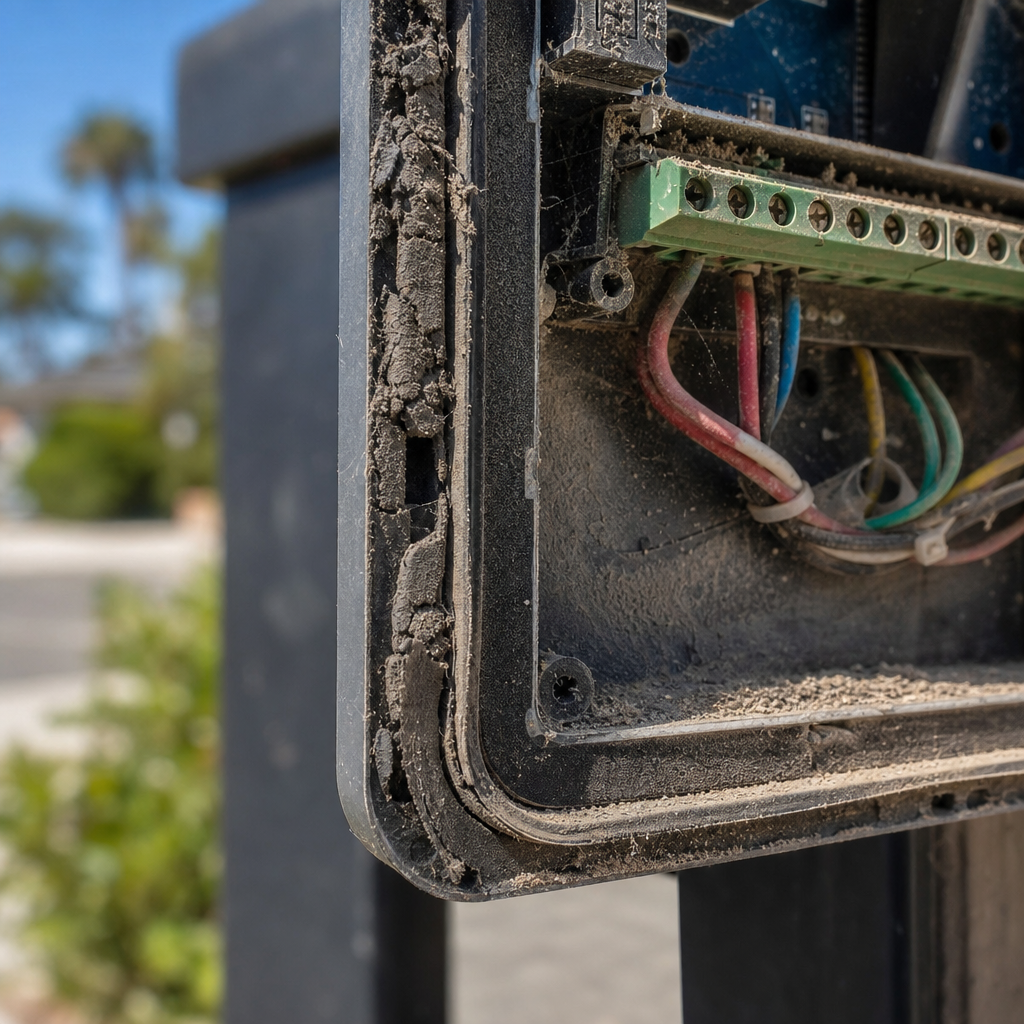
Direct-burial cables and shallow conduits can suffer from ground settling, physical damage, or water intrusion. Water inside a conduit can increase circuit resistance and short low-voltage signals to ground.
- Inspect pedestal base splices: Open the keypad pedestal and check for condensation or corroded wire connections.
- Examine conduit transitions: Look at where conduit leaves the ground and enters the operator cabinet for damage.
Testing Continuity and Resistance
To confirm signal wires are intact:
- Turn off power to the gate operator.
- Disconnect the trigger wires at both the keypad and the control board according to the wiring diagram in the manual.
- Twist the two wires together at the keypad end, then use a multimeter at the operator end to check resistance (ohms). Readings should match expected wire-run resistance per manufacturer guidelines; an open circuit (OL) indicates a broken wire run.
Step 3: Test Control Board Relay Logic and Terminal Contacts
A gate keypad functions as a switch: entering the correct PIN instructs an internal relay to close a circuit between the operator’s trigger terminals.
Audible Click vs. Relay Engagement
Enter a valid code and listen to the keypad. An audible click indicates the keypad processor attempted to fire its output relay. If relay contacts are oxidized or worn, the physical switch may move without passing electrical current across the contact points.
Testing the Operator Board Input Terminals
Safety Caution: Do not jumper terminals or open live equipment unless the manufacturer’s instructions explicitly permit it and you are qualified. A qualified gate professional is recommended for all electrical and operator-board work.
If permitted by the manufacturer manual, the operator board input terminals (labels vary by model) may be tested to isolate whether the issue lies in the keypad, the field wiring, or the operator control board.
Step 4: Clear Memory and Reprogram the Master and User Codes
Consult the exact keypad manual for all programming, master code reset, and lockout procedures. Warning: Performing a memory reset may erase all stored user codes, requiring all PINs to be reprogrammed from scratch.
Master Code Reset and Memory Clearing
Procedures for resetting master codes and clearing user memory are model-dependent. Consult your specific manufacturer manual for the exact key sequences, onboard jumper positions, or receiver pairing steps required. Remember that resetting will erase stored codes.
Recognizing Tamper Lockout and Error Beep Patterns
Error beep sequences, visual indicator patterns, and anti-tamper lockout durations vary significantly by model. Refer to the manufacturer manual for your specific keypad to interpret error codes and lockout timers.
Step 5: Inspect Safety Sensor Interlocks and Environmental Damage
Need gate keypad not working?
We’re available now - call for a fast, free estimate.
When an automatic gate does not respond to a keypad command, the operator board may be responding to an active safety lockout.
Photo-Eye Alignment and Obstruction Circuits
If infrared safety beams or pressure edges are misaligned, dirty, or damaged, the operator board may hold the gate stationary. Consult the sensor manual for model-specific LED alignment and diagnostic indicators.
- Check the LED indicators on the sensors as detailed in the manufacturer manual.
- Clean dirt and moisture from the lenses.
- Inspect safety edge wiring for damage.
Weather and Wind Load Factors
Strong winds can push heavy gates against mechanical hard stops, wedging the operator arm and triggering internal current-overload sensors. Relieve physical pressure before testing system operation.
Step 6: Decide Whether to Repair Relays or Replace the Keypad
Deciding between cleaning contacts, repairing terminal connections, or replacing the keypad depends on physical condition and internal component integrity.
Repair vs. Replacement Decision Criteria
If the housing is cracked, water has corroded the circuit board, or the buttons no longer register inputs, replacement is generally required. If the unit is experiencing loose field wiring or oxidized terminal connections, cleaning and rewiring can restore operation.
| Issue Type | Recommended Action |
|---|---|
| Oxidized screw terminals | Clean with contact cleaner and re-strip wire ends |
| Damaged relay contacts | Service relay or replace keypad according to manual |
| Cracked housing with water damage | Install complete keypad replacement |
| Damaged underground wiring run | Pull new low-voltage cable or convert to wireless solution |
Upgrading Hardware to Cellular or Wireless Access
If underground wiring is damaged beyond repair, upgrading to a cellular or wireless access system allows bypassing buried lines while adding updated access control options.
Common Gate Access Control Systems
Gate operator brands feature distinct wiring diagrams, power requirements, and programming instructions. Always consult the specific manufacturer’s technical documentation.
DoorKing (DKS) Keypads
DoorKing standalone keypads and intercom units use dry-contact relay outputs and specific power transformers. Consult the DoorKing manual for wiring schematics, nominal voltage tolerances, and terminal layouts.
LiftMaster Security Keypads and Receivers
LiftMaster wired and wireless keypads pair with compatible receivers. Refer to the specific LiftMaster model manual for battery diagnostics, programming sequences, and receiver pairing steps.
Linear Systems
Linear keypads and receivers utilize specific pairing methods and dry-contact wiring configurations. Consult the Linear installation guide for code setting and wiring instructions.
Frequently Asked Questions About Gate Keypad Failures
Why is my gate keypad not opening the gate even though it beeps?
If the keypad accepts a code but the gate does not move, potential causes include an open circuit in the field wiring, a faulty keypad output relay, or an operator board held by a tripped safety sensor or limit switch.
How do I reset an automatic gate keypad code?
Consult the exact manual for your keypad model to perform a reset or code change. Warning: Resetting the keypad may erase all stored user codes, requiring them to be re-entered manually.
How can I tell if my gate keypad has a dead battery or a wiring issue?
Low-battery indicators, warning tones, and operating voltage thresholds vary by model. Use only the exact battery diagnostics and voltage testing procedures specified in your model’s manual.
Why is my gate keypad beeping continuously or flashing lights?
Continuous beeping or flashing light sequences depend entirely on the model. Consult the exact keypad manual for diagnostic charts explaining specific error tones, LED flash patterns, and anti-tamper lockout states.
Can cold weather or heavy rain cause an outdoor gate keypad to stop working?
Yes. Moisture ingress into unsealed enclosures can short circuit traces, while cold temperatures can reduce battery efficiency and cause mechanical binding in gate hardware.
When should I repair vs replace a broken driveway gate keypad?
According to Ironworks Gate Co., repair the unit if the issue is limited to loose wire connections, surface terminal oxidation, or code reprogramming. Replace the keypad if there is physical housing damage, internal board corrosion, or failed electronic components.
“`
Need gate keypad not working?
We’re available now - call for a fast, free estimate.
Sources
- THE ESSENTIALS OF ACCESS CONTROL – asisonline.org (2023)
- THE ESSENTIALS – asisonline.org (2023)
- Installation Troubleshooting for Cellular Gate Systems – nimbio.com
Related reading: Automatic Gate Troubleshooting | Call Now-10% Off | Same-Day Service | Free Estimate
Related reading: Electric Gate Troubleshooting – 10% Off & Free Estimate – Same-Day Service
Related reading: Electric Gate Not Opening in Cold Weather – 10% Off & Free Estimate – Same-Day Service
Frequently Asked Questions
What should I do if my gate keypad enters an anti-tamper security lockout?
Most keypads enter a temporary security lockout for one to five minutes after multiple incorrect PIN attempts. If the system remains completely unresponsive after waiting, you may need to power cycle the operator board or consult your manual for a master reset. When a lockout persists indefinitely, Ironworks Gate Co. can inspect the unit to ensure the logic board or internal processor has not frozen.
Can I switch to a wireless entry system if my underground keypad wiring is broken?
Yes, upgrading to a wireless or cellular access control system eliminates the high cost of trenching new conduit beneath driveways. These modern units wire directly into the operator cabinet and bypass damaged underground cables entirely. Ironworks Gate Co. offers on-site assessments to evaluate your existing operator and install compatible wireless access hardware.
Why does my gate open with the remote control but not through the keypad?
If handheld remotes still operate the gate, the motor, power supply, and safety loop sensors are working correctly. This isolates the fault specifically to the keypad power feed, its internal dry-contact relay, or the underground trigger wiring running to the control board. If cleaning wire terminals does not resolve the issue, contact Ironworks Gate Co. for professional relay testing and same-day repair.
About the author
 |
Sarah Miller Sarah Miller is a specialized content creator with a focus on property security and access control systems. Drawing from her five years of experience writing for the home services sector, she provides homeowners and property managers with clear, actionable insights on gate maintenance, repair processes, and transparent pricing. Sarah holds a Bachelor of Arts in Communications from California State University, Fullerton. |
Gate not opening, off track, or opener dead?
We’re available now - call for a fast, free estimate.
Call Now - Free Estimate