
Quick Summary
Learning how to fix automatic gate issues begins with isolating whether sudden operational failures are caused by electrical power disruptions, misaligned safety sensors, or physical track obstructions. Ironworks Gate Co. outlines practical troubleshooting steps, advising property owners to safely test manual gate movement, clean optical photo-eyes, and inspect drive hardware before resetting the operator. After reading, you will be equipped to diagnose common gate malfunctions safely and recognize when to schedule a professional on-site assessment and same-day repair for complex electrical or structural faults.
How to Fix Automatic Gate Issues Fast: A Troubleshooting Guide
When an automatic driveway gate stops moving, the natural reflex is to press the remote harder or start poking around the control box. However, common causes of gate failure can include power or control faults, physical obstructions, and failed or misaligned entrapment-protection devices. Physical resistance, such as a sagging swing leaf or a sliding track settled into shifting soil, can also create enough drag to trigger an operator’s built-in safety limit. Learning how to troubleshoot automatic gate issues, as noted by technicians at Ironworks Gate Co., starts with distinguishing physical drag and obstructions from electrical or control faults. Please note that this guide provides general troubleshooting information and is not local unless a specific jurisdiction, local code, and service area are supplied.[2]
WARNING: Always isolate the equipment from its power source whenever performing work that could leave the gate unsafe, and secure the gate against unintended manual movement during inspection or repair. Powered gates generate high torque and present entrapment, crushing, and impact risks. Safety data from the U.S. Consumer Product Safety Commission (CPSC) documented 32 automatic-gate deaths, including 20 child deaths, through 2001, and separately reported more than a dozen deaths and injuries associated with manual sliding and swinging gates over a six-year period. Routine maintenance and safety checks are essential to keep these systems operating safely.[1]
Use the diagnostic process below to identify common issues safely, while referring to your specific operator manual for manufacturer-dependent procedures.
Automatic Gate Troubleshooting: Quick Diagnostics and Overview
Quick Diagnostic Summary: When an electric gate fails to open or close, check the circuit breaker and remote batteries first. Next, confirm the path is clear and use the designated manual release mechanism per the manufacturer’s manual to test movement by hand. If the gate binds or drags, check for structural sag, track deflection, or physical obstructions. If it moves smoothly, inspect safety devices such as photo-eyes and safety edges for dirt, misalignment, or damage before calling a qualified professional for control or electrical diagnostics.
Safe operation requires verifying force limitation, safety edges, obstacle detection, reliable stopping mechanisms, physical end stops, and protection against falling or tipping hazards. Never attempt to overcome mechanical resistance by altering force settings, which must only be adjusted by a qualified technician.[5]
Common Gate Failure Checklist
- Check the Power Feed: Confirm the main breaker has not tripped and the outdoor disconnect or GFCI outlet is active.
- Test for Mechanical Drag and Obstructions: Disengage the operator using the designated release mechanism and test the gate by hand to spot hinge drop, roller binding, track settlement, or falling and tipping hazards.
- Inspect Entrapment-Protection Devices: Clean photo-eye lenses and safety edges, confirming that sensors and indicator lights operate according to manufacturer specifications.
What You Need Before Troubleshooting Your Electric Gate
Having basic visual inspection tools and manufacturer documentation on hand makes identifying issues safer and more effective.
Recommended Diagnostic Gear
| Inspection Level | Recommended Tools | Primary Purpose |
|---|---|---|
| Basic Physical Checks | Torpedo level, tape measure, manufacturer-designated manual release key or tool | Check post plumb, measure ground clearance, test manual movement |
| Professional System Tests | Specialized diagnostic equipment (qualified technician only) | Verify supply voltage, test control circuits, calibrate force limits |
Keys and Documentation
Locate the designated manual release key or tool provided for your specific operator model. Keep the operator manual and model number accessible to check manufacturer-specific reset procedures, limit-learning steps, and indicator codes.
Step 1: Verify Power Supply and Test the Manual Release
Start by confirming that the operator is receiving electricity. Power outages, blown fuses, and tripped ground-fault breakers are common causes of sudden gate stops.
Checking the Main Electrical Feed
- Inspect your main electrical panel for tripped breakers dedicated to the gate circuit.
- Locate the outdoor power disconnect or GFCI outlet near the gate operator. Reset any tripped GFCI devices.
- For solar-powered setups, inspect battery terminals and charge status according to the manufacturer’s manual.
Disengaging the Manual Release Safely
To check for mechanical binding or track resistance, disengage the operator following manufacturer safety rules:[3]
- Ensure pets, vehicles, and bystanders are completely clear of the gate path.
- Use only the designated manual release mechanism for your specific operator model, strictly following the instructions in its manual.
- Confirm the gate path is clear, and never force the gate or disable safety equipment.
- Gently guide the gate through its travel path by hand while checking that it remains secure against falling or tipping.
If the gate moves smoothly with minimal effort, the issue may involve electrical controls, power faults, or entrapment-protection devices. If the gate binds, scrapes, or requires heavy effort, structural or mechanical components require service.
Step 2: Inspect Mechanical Hinges, Tracks, End Stops, and Structural Alignment
Need how to fix automatic gate?
We’re available now - call for a fast, free estimate.
Gate posts and frames experience continuous environmental stress and ground movement over time, which can lead to post lean, hinge wear, or track deflection.
Diagnosing Ground Clearance and Travel Arc Deflection
Inspect the clearance between the gate and the ground across its entire travel path:
- Swing Gates: Check the outer edge during the swing cycle to ensure the post is plumb and the bottom of the leaf does not contact the driveway. Verify that positive end stops are secure.
- Sliding Gates: Check the track for low spots, shifting ground, debris, gravel, or standing water that can cause bottom guide rollers to bind or derail. Ensure positive physical end stops prevent over-travel.
Checking for Structural Hazards and Bearing Wear
- Place a level against the hinge or guide post to confirm it is plumb.
- Inspect hinges, rollers, and brackets for wear, cracked welds, or loose fasteners.
- Check for loose hinge pins or worn bearings, and confirm that the gate leaf is properly retained to prevent tipping or falling hazards.
As specialists at Ironworks Gate Co. explain, when an operator detects excessive physical resistance, its obstacle-detection system may stop or reverse the gate to prevent entrapment.
Step 3: Clean, Inspect, and Align Entrapment-Protection Devices
Entrapment-protection devices, including photo-eyes and safety edges, prevent gate movement when an obstacle is detected. A dirty, damaged, or misaligned sensor will stop normal operation.
Clearing Obstructions and Debris
Leaves, spiderwebs, insects, and dust can obstruct optical sensor lenses. Clear away debris with a soft brush or cloth. In certain installations, direct low-angle sunlight may also interfere with optical reception depending on sensor design.
Aligning Photo-Eye Sensors
- Check the indicator lights on both the sending and receiving sensor units according to the manufacturer manual.
- Verify that the alignment LEDs indicate an active, unobstructed beam (exact LED colors and behaviors vary by manufacturer and model).
- If the sensor is misaligned, adjust the bracket until steady alignment is confirmed per the manual, then secure the mounting hardware. Never bypass or disconnect monitored safety devices.
Step 4: Inspect Drive Hardware, Limit Switches, and Safety Edges
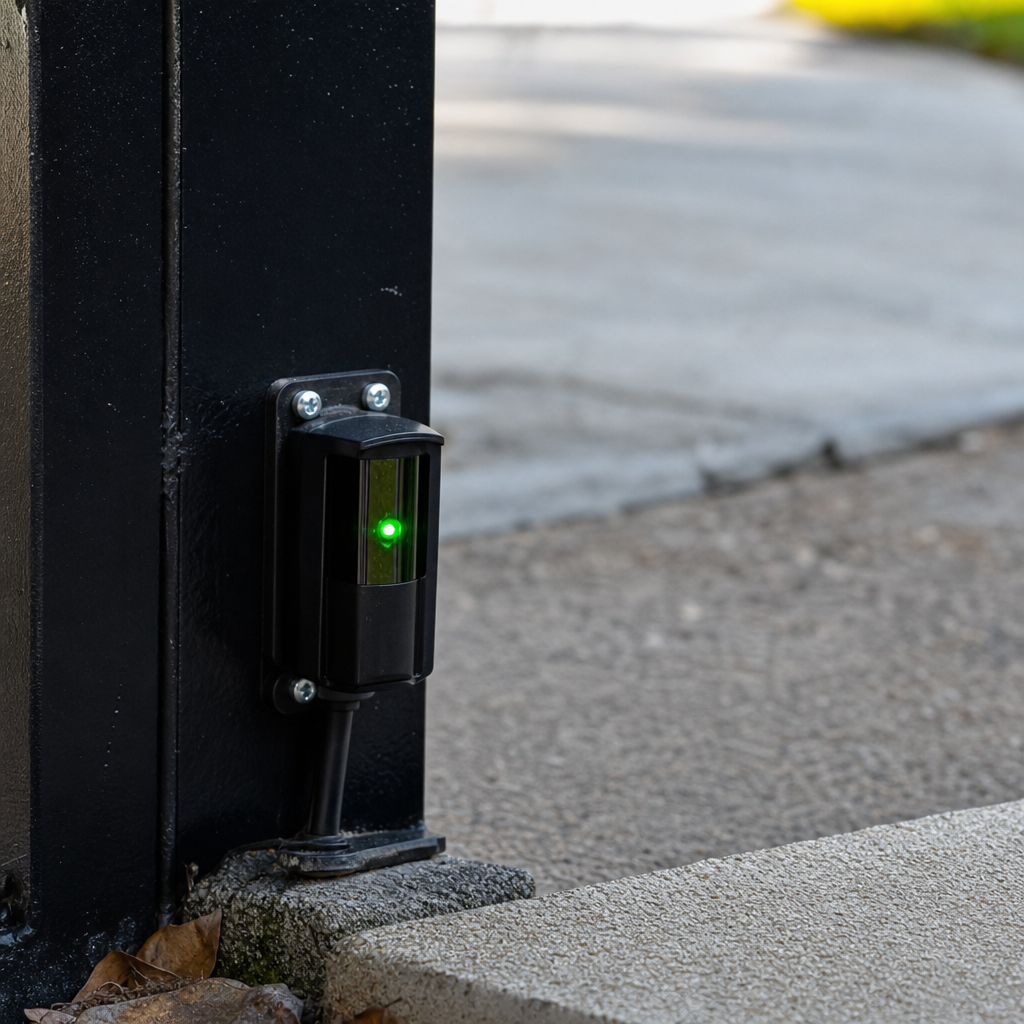
If safety sensors are clear and the gate moves freely by hand, inspect the drive hardware, limits, and safety edges according to manufacturer specifications.
Checking Drive Chains, Belts, and Arms
For sliding gates, inspect the drive chain or belt for proper tension, alignment, and secure mounting according to manufacturer instructions. For swing gates, inspect operator arms, pivot pins, and mounting brackets for loose hardware or excessive wear.
Checking Limit Switches, Stops, and Safety Edges
- Examine mechanical limit cams, magnetic limit collars, or internal limit mechanisms per the operator manual.
- Confirm that limit components have not slipped, and verify that physical end stops are present and firmly anchored to prevent the gate from over-traveling or coming off its track.
- Inspect safety edges along leading and trailing gate edges for physical damage, cuts, or loose wiring.
Step 5: Resetting the Gate Operator
Reset procedures vary by model and may involve clearing an obstruction, restoring power, or following a model-specific reset or limit-learning procedure. Always consult the operator manual, and never bypass monitored safety devices.
General Reset Procedure
- Confirm that the gate path, safety sensors, and safety edges are completely clear of obstructions.
- Turn off the dedicated electrical breaker or master power switch to isolate the operator from its power source.
- Restore power following the specific restart sequence outlined in the operator manual.
- Initiate a test cycle using the primary control device while monitoring for reliable stopping and reversal.
Safety Warning on Electrical and Control Components
Do not perform live electrical testing or open high-voltage control cabinets. If diagnostic inspection reveals damaged circuit boards, blown fuses, water intrusion, or scorched components, contact a qualified technician. Electrical faults, control-board replacement, force limit calibration, and structural repairs should always be handled by a qualified professional.
Step 6: Know When to Call a Qualified Professional
Need how to fix automatic gate?
We’re available now - call for a fast, free estimate.
Certain gate repairs involve high mechanical forces, heavy structural loads, or hazardous electrical circuits that require professional service.
High-Risk Repairs Requiring a Qualified Technician
- Structural Repairs and Welding: Re-hanging heavy gate leaves, repairing cracked welds, replacing worn hinge posts, or remediating falling and tipping hazards.
- Internal Motor and Gearbox Service: Addressing grinding gearboxes, failing hydraulic rams, or internal drive motor failures.
- Force Limitation and Safety Calibration: Calibrating internal force limits, safety edges, obstacle detection systems, and reliable stopping mechanisms to ensure full entrapment protection.
- Electrical and Control-Board Work: Troubleshooting wiring faults, power supplies, or replacing electronic logic boards.
Overview of Gate Operator Systems
Gate operators vary widely by manufacturer in their mechanical layouts, control electronics, and diagnostic interfaces. Always consult the specific manufacturer manual for your model to confirm operational and troubleshooting details:
- Residential and Commercial Operators (e.g., LiftMaster, DoorKing, Viking Access, and other brands): Depending on the specific model and manufacturer, operators may feature internal limit sensors, status indicator LEDs, diagnostic code displays, or modular control boards designed to integrate with monitored safety devices and loop detectors. Specific diagnostic displays, error codes, and maintenance requirements are manufacturer-dependent and must be verified in the operator manual.
Routine Maintenance and Safety Checks
Routine maintenance and safety checks should follow the manufacturer’s instructions and applicable local requirements to ensure safe, dependable operation:[4]
- Hardware and Lubrication: Routinely inspect and lubricate hinges, guide rollers, and drive chains according to manufacturer-recommended lubricant types and intervals.
- Safety and Entrapment Protection: Periodically test obstacle detection, photo-eyes, safety edges, and reliable stopping mechanisms to ensure proper reversal and compliance with safety guidelines.
- Structural and Hazard Checks: According to maintenance protocols from Ironworks Gate Co., regularly verify post plumb, structural welds, anchor bolts, end stops, ground clearances, and safeguards against falling or tipping hazards.
Frequently Asked Questions About Automatic Driveway Gate Repair
Why is my automatic gate not opening or closing?
Common causes include power or control faults, physical obstructions along the gate path, depleted remote batteries, or failed or misaligned entrapment-protection devices such as photo-eyes or safety edges.
How do I manually open an electric gate when the power is out?
Use only the designated manual release mechanism for your specific operator model, strictly following the operator manual. Confirm the path is clear, and never force the gate leaf or disable safety equipment.
How do I reset an automatic driveway gate opener?
Reset procedures vary by model and may involve clearing an obstruction, cycling power at the main breaker, or following a model-specific reset or limit-learning procedure specified in the operator manual. Do not bypass monitored safety devices.
Why does my automatic gate start to close and then reverse?
This typically indicates that an entrapment-protection device (such as an optical sensor or safety edge) has detected an obstacle, or that mechanical drag along the gate track or hinges has triggered the obstacle-detection system.
How do I troubleshoot and align automatic gate safety sensors?
Clean the sensor lenses and check for physical alignment per the manufacturer’s instructions. Adjust the brackets so indicator lights confirm an uninterrupted beam, and ensure all wiring is intact. Never bypass or tamper with monitored safety devices.
When should I call a professional gate repair technician?
Call a qualified technician for electrical faults, control-board diagnostics, force limitation adjustments, safety edge repairs, internal motor or gearbox problems, or any structural repairs involving heavy gate leaves, posts, or tipping hazards.
Need how to fix automatic gate?
We’re available now - call for a fast, free estimate.
Sources
- New Safety Standard for Automatic Security Gates Helps Prevent … – cpsc.gov (2000)
- Final Rule – Safety Standard for Gates and Enclosures – CPSC – cpsc.gov (2020)
- www.govinfo.gov › content › pkg40100 Federal Register /Vol. 85, No. 129/Monday, July 6, 2020 … – govinfo.gov (2020)
- Ensuring powered doors and gates are safe – hse.gov.uk (2003)
- Health and Safety Guidance for Powered (Automatic) … – api.warwickshire.gov.uk (2019)
Related reading: Ironworks Gate Co Warranty | Call Now-10% Off | Same-Day Service | Free Estimate
Related reading: How to Open Electric Gate Without Power | Call Now-10% Off | Same-Day Service | Free Estimate
Frequently Asked Questions
How often should I perform routine maintenance on an automatic gate?
Property owners should conduct monthly visual checks of photo-eyes and clear track debris, while lubricating hinges, guide rollers, and chains every six months. Scheduling a periodic comprehensive inspection with Ironworks Gate Co. ensures mechanical force limits, structural posts, and electrical safety devices remain fully compliant and reliable.
Why is my automatic gate motor humming or grinding without moving the gate?
A humming or grinding sound typically indicates an internal gearbox failure, a seized motor capacitor, or extreme mechanical binding along the track. Safely disengage the manual release to check for physical obstructions, but avoid running the motor repeatedly to prevent permanent component burnout before a technician inspects it.
What should I do if basic DIY troubleshooting does not fix my electric gate?
When cleaning sensors, checking breakers, and clearing physical obstructions fail to restore operation, the issue likely involves internal logic board faults, broken drive assemblies, or sagging structural posts. Ironworks Gate Co. offers free on-site assessments and same-day repair services to safely diagnose and resolve complex mechanical and electrical gate failures.
About the author
 |
Sarah Miller Sarah Miller is a specialized content creator with a focus on property security and access control systems. Drawing from her five years of experience writing for the home services sector, she provides homeowners and property managers with clear, actionable insights on gate maintenance, repair processes, and transparent pricing. Sarah holds a Bachelor of Arts in Communications from California State University, Fullerton. |
Gate not opening, off track, or opener dead?
We’re available now - call for a fast, free estimate.
Call Now - Free Estimate